

Auto-Categorization Now Runs on Every New Transaction
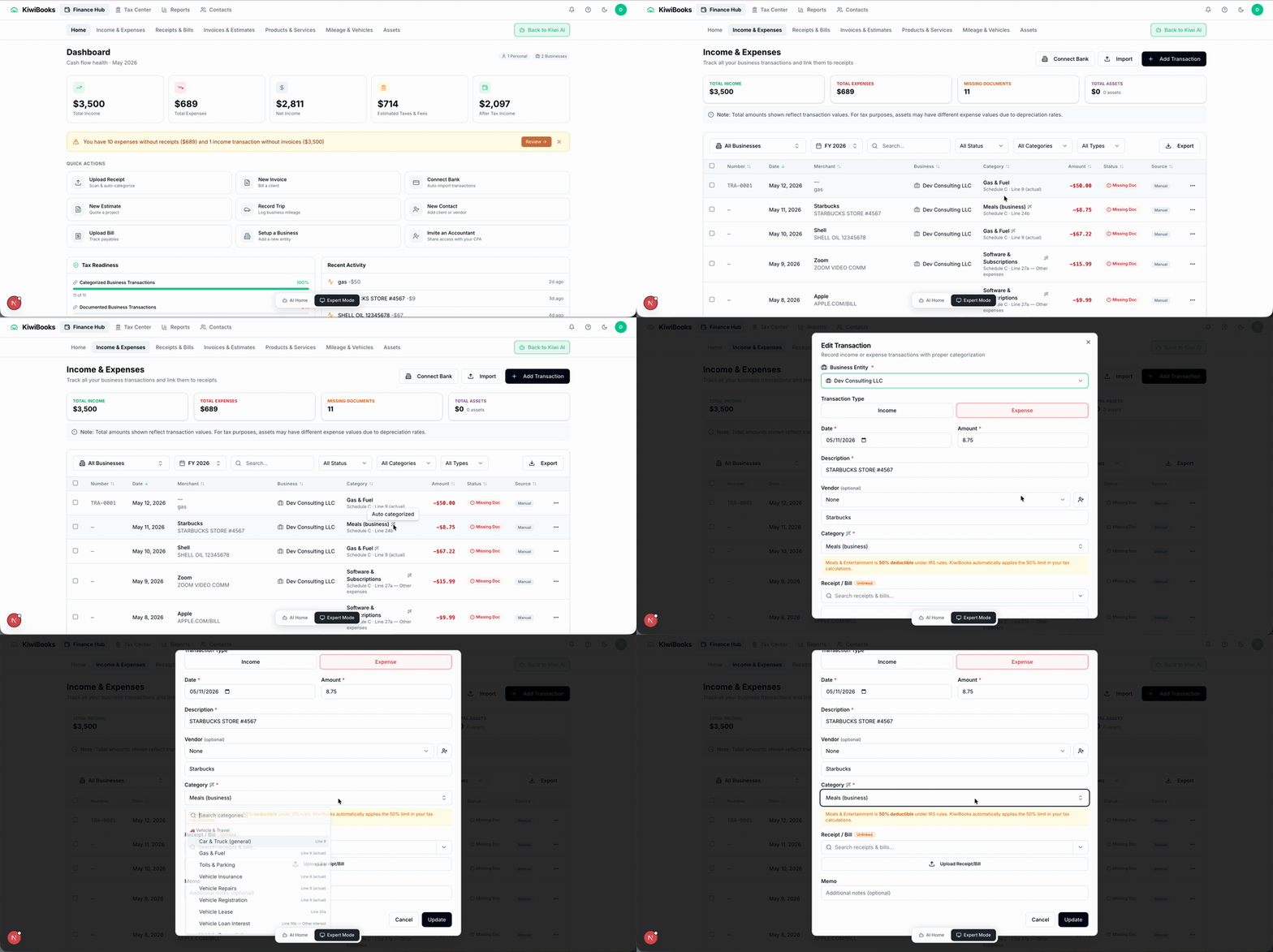
The work most sole proprietors hate about bookkeeping is the same task every month: opening the transactions list, looking at a charge from "STARBUCKS STORE #4567", and clicking through to assign it the right category. Multiply that by 80 to 120 transactions a month, and you have an evening of work that nothing about running your business actually required.
We've now removed that step from the workflow.
What changed
KiwiBooks reads the merchant and description on every new transaction, picks the matching expense category, and writes the Schedule C line. The categorization happens in the background the moment the transaction lands.
The same model runs across all three intake paths:
- Manual entry in the app
- CSV import from any source
- Plaid bank feed, including historical sync on first connect
You don't toggle it on. You don't pick which transactions get processed. Auto-categorization is the default behavior on every account.
What you see in the transactions table
Open the table after a fresh import and the category column is already filled in. Every AI-set entry shows a small wand icon, and hovering on a category reveals an Auto categorized tooltip, so you can tell at a glance which categories the model set and which you set yourself.
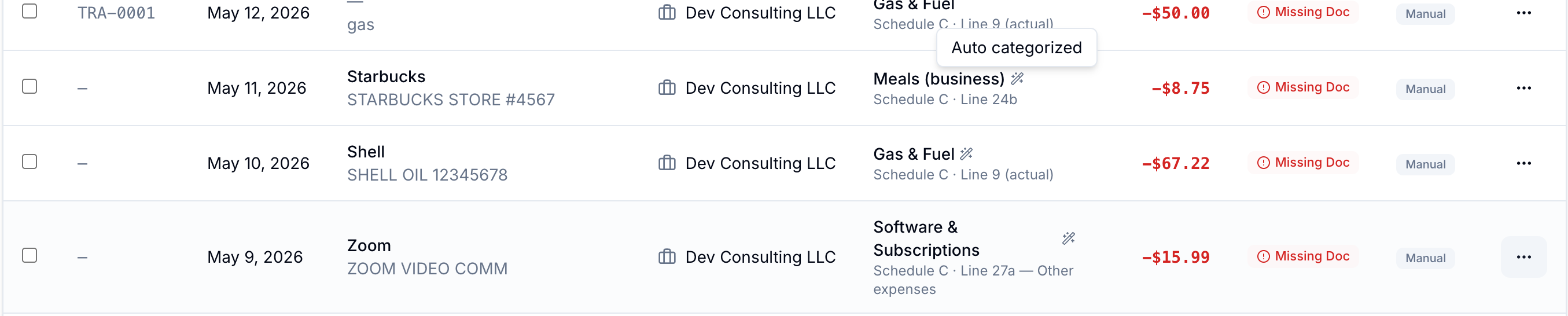
The Schedule C line maps in with the category. Coffee runs from Starbucks land on Line 24b (Meals). Gas stations hit Line 9 (actual vehicle expenses). Software subscriptions go to Line 27a. Your CPA opens the year-end export and the lines are already populated.
How much time this gives back
A typical sole proprietor with one business account and a card processes 80 to 120 transactions in a month. At fifteen to thirty seconds per transaction to categorize, that's 30 to 60 minutes a month of manual coding. Across a year, that's roughly ten hours of evening work that contributed nothing to the business.
Auto-categorization handles about 95% of those decisions correctly on the first pass. The remaining 5% are usually ambiguous vendors (Costco, Amazon, anything that could be office supplies or personal) where context lives in your head, not in the description.
Categories that carry the deduction treatment
The model is trained on Schedule C structure rather than a generic chart of accounts. When it picks "Meals (business)" for a coffee meeting, it picks the deduction treatment that goes with it: 50% deductible, Line 24b. When it picks "Gas & Fuel", it routes to Line 9 with the actual-expense method already selected.
This matters because the wrong category costs you money at year-end. A meal coded as "office expense" gets fully deducted when only half should be. A gas purchase coded as "auto repair" lands on the wrong Schedule C line, and your CPA either chases it or misses it. The category and the deduction are the same job.
The model learns from your corrections
You will sometimes disagree with the prediction, and that's expected. The first time you change a category on a vendor, the model records the override and weights it heavily for future matches on the same vendor against your business. The second time you see "COSTCO WHOLESALE #1234", the prediction has already shifted.
Changes from your CPA carry the same weight. If your accountant moves a transaction during the close, the model treats that as ground truth and uses it the next time the same merchant appears.
The learning is per-business. Two KiwiBooks accounts can categorize the same vendor differently, because each one has trained the model on its own corrections.
Where this fits
The broader shift in AI accounting is firms moving the commoditized work (data entry, transaction coding, reconciliation) onto models, so people can spend their time on judgment and advice. Auto-categorization is the version of that for sole proprietors and small business owners. The Schedule C category was always available. The work to put each transaction in it was the bottleneck.
The bottleneck is gone. Open the app, connect your bank, and the work that used to wait for a Saturday is already done.
Ready to simplify your bookkeeping?
Start your free trial today, no credit card required.
Try KiwiBooks Free